



Prepare for a Successful Wisconsin Private School Choice Audit
As discussed in previous blogs ( read What to Expect from Your Wisconsin Private School Choice Program Audits and Top PSCP Audit Findings and How to Avoid Them) and webinars, being in the Wisconsin Private School Choice Program (Choice) requires four audits and a lot of information to be provided for each engagement. Therefore, having an audit-ready system in place will make these audits feel like a lot less work, and if you put in a little effort up front, you may even get to the point where you enjoy the experience. Although, that might be a bit of wishful thinking on our part.
Step 1: Organize your Internal Folders
The first step to building an audit-ready system is making sure your internal folders are organized and information is easily accessible.
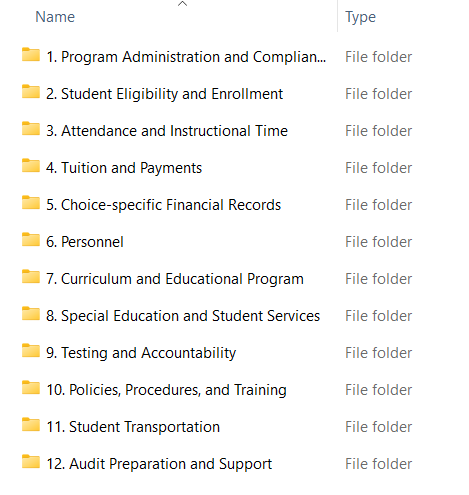
Below is a recommended set-up of twelve main folders and related sub-folders that can be tailored to the needs of your school:
1. Program Administration and Compliance
- Choice contract/agreement
- DPI communications and guidance
- School calendar
- Board policies relevant to Choice
- Accreditation and documentation
- Nondiscrimination policy
- Enrollment caps and eligibility documentation
- Prior audit reports and corrective actions
- Documentation of internal controls
- Organizational chart
- Budget with required components
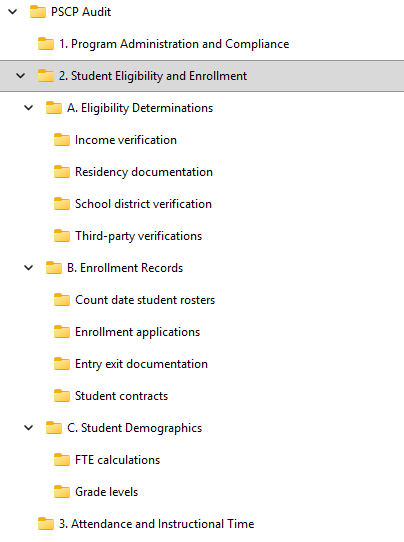
2. Student Eligibility and Enrollment
This folder should have restricted access.
- A. Eligibility Determinations
- Income verification
- Residency documentation
- School district verification
- Third-party verifications
- B. Enrollment Records
- Student contracts
- Enrollment applications
- Count date student rosters
- Entry/exit documentation
- C. Student Demographics
- Grade levels
- FTE calculations
3. Attendance and Instructional Time
- Daily attendance records
- Absence documentation
- Instructional hours
- Bell schedules
- Teacher schedules
- Makeup day documentation
- Virtual/alternative instruction records (if applicable)
4. Tuition and Payments
- DPI payment records
- Tuition rate calculations
- Student tuition schedules
- Payment receipts
- Refund documentation
- Reconciliation reports
5. Choice-Specific Financial Records
- General ledger (if separate from entity-wide)
- Bank statements
- Revenue Choice payments
- Choice expenditures (for direct costs)
- Allocation methodology (for shared costs)
6. Personnel
- Teacher licenses/diplomas/official transcripts
- Staff contracts
- Payroll registers
- Time and effort documentation
- Benefit allocations
- Background checks
- Staff roster
7. Curriculum and Educational Program
- Curriculum outlines by subject
- Textbook lists
- Assessment plans
- Special programs documentation
- Graduation requirements (if applicable)
8. Special Education and Student Services
- Service plans
- Third-party provider contracts
- Service logs
- Evaluation documentation
- DPI communications related to services
This folder is needed for schools not participating in the Wisconsin Special Needs Scholarship Program
9. Testing and Accountability
- Required assessment documentation
- Test participation records
- Test security policies
- Results summaries (student-level where allowed)
- Graduation requirements (if applicable)
10. Policies, Procedures, and Training
- Written procedures for Choice compliance
- Staff training materials
- Attendance policy
- Discipline policy
- Financial controls policy
11. Student Transportation
- List of vehicles owned by the school and maximum capacity
- List of approved drivers
- Background checks for each driver
- Logs for each time the vehicles were used and what students were in the vehicle
- Certificate of insurance
- Inspection reports
- Proof of maintenance and repairs made (if deemed necessary on the inspection report)
12. Audit Preparation and Support
- Auditor request lists (consider a subfolder for each request item)
- Notes and explanations
- Supporting documentation (unless maintained physically or in software like Bill.com)
- Internal review checklist
- Communication with auditors
Step 2: Verify Data
The second step for being audit-ready is making sure you are doing more than just collecting data, but you are actively verifying it. The purpose is to ensure that student data in the Student Information System (SIS) is accurate, complete, consistent, and corrected before the count dates.
Below are five key reviews that should be performed:
Enrollment Status
This should occur monthly.
Verify the following for each Choice student:
- Name (should be the student’s legal name)
- Enrollment status
- Entry date
- Exit date (if applicable)
- FTE status
- Grade level
This information should be compared against the students contract/application, entry/exit conforms, and student rosters.
Count Date Attendance
This should occur near the count date (September and January).
Count attendance records have:
- Each student’s attendance on the count date or one day before AND one day after (including virtual attendance)
- Signatures by the classroom teacher to document accuracy of the records
- No unexplained gaps
- Absences properly coded and documentation of the reason for the absence
Count attendance records should be reconciled so that the SIS attendance and manual logs (if used) match.
Eligibility
This should occur before the count date (September and January).
Review the following for each Choice student:
- Residency status
- Age/grade eligibility
- Income eligibility
- Changes from when the application was first obtained (i.e. address, name, etc.)
- Folder for all proper documentation to support their application
Tuition
This should occur monthly and can be performed in conjunction with the enrollment status review.
Review the following for each student:
- Payment category (private pay vs Choice)
- Tuition rate (it either matches the school’s tuition schedule or choice tuition rate)
Reconcile the following:
- Choice tuition per the SIS to the DPI payment reports
- The DPI payment reports to the applicable revenue account in the schools accounting software
- Private pay tuition per the SIS to the applicable revenue account in the schools accounting software
Verify that Choice students were not charged tuition and that any fees charged were allowable.
Change Log
This should occur at least monthly but potentially weekly during periods with a lot of change (i.e. start of the school year).
Review changes (i.e. attendance, tuition fields, enrollment, name, etc.) in the SIS to ensure that the change was accurate and documented.
To document that these reviews are occurring, you can make a SIS validation log that includes:
- Month reviewed
- Who performed the review and who verified the review actually took place
- What elements should be reviewed
- Issues identified
- Corrections made
Step 3: Develop a Strong Relationship with your Auditors
The third step you can take to being audit-ready is building a good relationship with your auditors. At the end of the day, auditors want you to have a successful audit that is free from noncompliance or deficiencies. Auditors are advisors and verifiers not adversaries.
Therefore, schools should:
- Have open communication that occurs throughout the year regarding issues, changes, or uncertainties.
- Provide everything that is requested in an organized manner and by the deadline.
- Appropriately name electronic files.
- Track things that are not going well in order to provide feedback to the auditors.
- For example, was there a description on an audit request list item confusing that resulted in you providing an incorrect item? Providing this type of feedback to the auditors can make future audits easier.
- Designate one person to handle communication, collecting documentation from applicable staff, and tracking outstanding requests and deadlines.
Keeping Choice records well organized, regularly checking student data in the SIS, and communicating clearly with auditors all work together to support a smooth and successful audit. When these practices are used consistently, they help the school identify and correct issues early, stay compliant with Choice requirements, and approach the audit process with confidence.