



What Is IRS Direct Pay?
IRS Direct Pay is a free, secure way to pay federal taxes directly from your bank account without paying any processing fees. If you want to avoid credit card fees or third-party payment platforms, Direct Pay is one of the simplest options available.
You can also schedule payments up to 365 days in advance, making it especially useful for estimated taxes or planned balance-due payments.
Below is a clear, step-by-step guide to using IRS Direct Pay correctly, along with examples to help you choose the right payment type.
*Some businesses and tax types may also use the IRS Electronic Federal Tax Payment System (EFTPS). Business payments over $10 million must be made through EFTPS.
How to Use IRS Direct Pay
Step 1: Go to the IRS Direct Pay website
Visit the IRS Direct Pay page on IRS.gov and select “Make a Payment.”
Step 2: Choose your tax type
Indicate whether the payment is for:
Step 3: Select your payment reason, application, and tax year
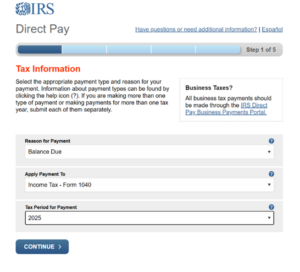
You’ll be asked to select from a drop-down menu:
- Reason for payment
- How the payment should be applied
- Tax year payment should be applied to
Choosing the wrong option can cause your payment to be misapplied or delayed.
Common options for individuals:
- Balance Due – when you owe tax after filing your return
- Estimated Tax – typically used for quarterly payments
- Notice or Bill – when responding to an IRS notice
Common options for businesses*:
- Payroll taxes (such as Forms 941 or 940)
- Estimated tax payments (for applicable entities)
- Notice or bill payments
If you’re unsure which option applies, refer to IRS guidance on selecting the correct payment reason.
*Setting up an IRS ID.me account for yourself or your business allows you to make payments without additional verification. Learn more about these accounts here.
Step 4: Verify your identity
To protect your information, the IRS will ask you to confirm details from a previously filed tax return, including:
- Tax year for verification
- Filing status
- Full legal name
- Social Security number or ITIN
- Date of birth
- Address
On this page you must also accept the Privacy Act and Paperwork Reduction Act before continuing. By clicking “I agree,” you’re simply allowing the IRS to use the information you enter to process and apply your tax payment. You’re also acknowledging that the information must be accurate, is required to complete the payment, and may be shared with other government agencies only when legally permitted.
Step 5: Enter your payment details
Provide:
- Bank routing number
- Bank account number (checking or savings)
- Payment amount
- Payment date
There is also an option to schedule the payment for a future date if needed.
Step 6: Review and agree to the disclosure
Read and accept the IRS disclosure and authorization agreement.
Step 7: Review and electronically sign
Confirm all details, then electronically sign using your name and Social Security number.
Step 8: Save your confirmation
After submission, you’ll receive a confirmation number. Save or print this page. It serves as your official proof of payment.
Final Tip
IRS Direct Pay is one of the easiest and most cost-effective ways to pay federal taxes. If you’re uncertain how a payment fits into your broader tax strategy or want to avoid costly misapplications, working with a trusted tax advisor can help ensure everything is handled correctly and with less stress.
Get in touch to learn more about Wegner CPAs tax planning services.
For more tax resources, visit our Tax Hub.