



An Identity Protection Personal Identification Number (IP PIN) is a six-digit number assigned by the IRS to prevent tax-related identity theft. The IP PIN works as a form of “two factor authorization.” We strongly recommend all clients obtain an IP PIN to protect themselves from potential fraud this tax season. IP PINs are updated on a yearly basis, and 2026 PINs are now updated in IRS accounts.
Click here to log into your ID.me account.
Whether you’re renewing your existing IP PIN or applying for the first time, following these straightforward steps will help ensure your federal tax returns are filed securely and accurately.
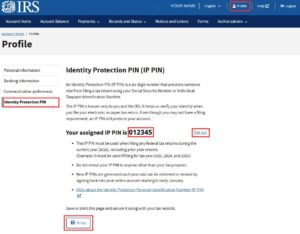
Obtaining Your IP PIN for 2026
For individuals who have obtained an IP PIN in the past, retrieving your 2026 PIN is as simple as logging into your ID.me account:
- Access Your IRS Account: Log in to your existing IRS online account.
- Retrieve Your IP PIN: Once logged in, click on “profile” in the upper navigation bar, and select the “Identity Protection PIN” link on the lefthand side of your profile to view your current IP PIN for the 2025 filing season.
For First-Time IP PIN Applicants:
- Create an ID.me Account:
- Visit the IRS Website: Go to the IRS IP PIN page.
- Initiate ID.me Account Creation: Click on “Get an IP PIN” and follow the prompts to create an ID.me account.
- What you’ll need:
- Social security number
- Government Issued ID
- What you’ll need:
- Verify Your Identity: Complete the identity verification process, which may include uploading documents and taking a video selfie.
- Obtain Your IP PIN: After verification, access your IRS account to receive your IP PIN for the 2026 filing season.
For detailed guidance on setting up an ID.me account and verifying your identity, refer to Wegner CPAs’ resource page or set up an appointment with our staff.